I was trying to do something I’d done a dozen times.
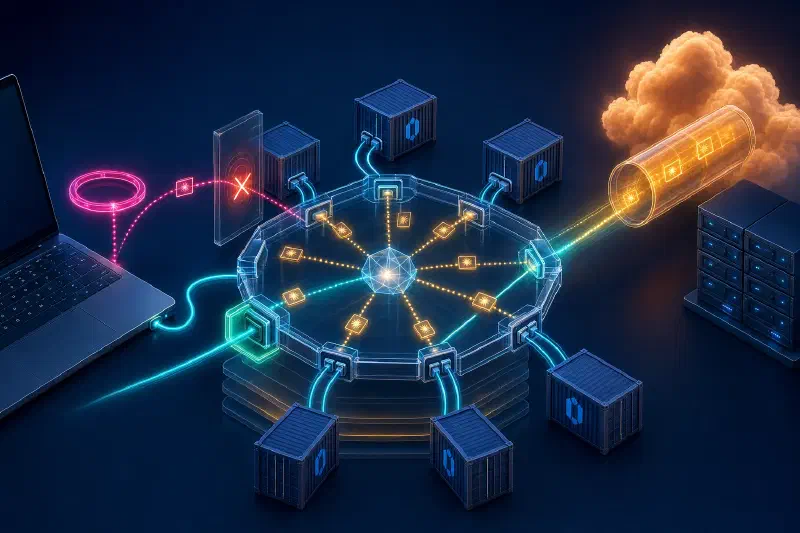
Set up Portainer — the Docker management UI — on my laptop. Have it manage a remote server through a Cloudflare tunnel so nothing is exposed publicly. The remote machine runs a Portainer agent; the laptop runs the Portainer server; they talk over SSH wrapped in Cloudflare Access.
I knew the moving parts. I’d touched all of them before. SSH tunnels, Docker, Portainer, Cloudflare — none of this was new.
It didn’t work.
The agent on the remote was alive. The UI on my laptop was alive. Both endpoints were reachable when I poked them from a terminal. But when I clicked Connect in the Portainer UI, I got the cleanest, most damning error in all of networking:
Get "https://host.containers.internal:19001/ping": dial tcp 10.88.0.1:19001: connect: connection refused
“Connection refused.” The kind of error that means something is rejecting your call. Not “no answer,” not “no route,” but a deliberate door slam.
I stared at it for an embarrassing amount of time. Every link in the chain checked out individually. The agent was listening. The SSH tunnel had bound its port. curl from the laptop to the tunnel worked. The Portainer container itself was healthy.
Each piece was fine. The error said something about an interface I couldn’t even fully explain — 10.88.0.1 — and a hostname I’d typed for years without really thinking about what it meant — host.containers.internal.
That was the moment.
The Honest Admission
I’d been operating on memorized commands.
I knew ssh -L forwards a port. I knew docker run -p 9001:9001 “exposes” a port. I knew 127.0.0.1 was “localhost.” I’d typed all of this hundreds of times and it had always just worked. And when it didn’t, I’d usually fix it by stack-overflowing my way to a different flag combination that did work, without ever understanding why.
I learned the OSI model in college as seven boxes to memorize for the exam. Physical, data link, network, transport, session, presentation, application. I could’ve named them on a quiz. I could not have told you what the difference between a bridge and a router is. I’d worked professionally for years without filling that gap, because the abstractions sit on top of each other so cleanly that you can build whole careers on the top layer and pretend the bottom six aren’t there.
But they are there. And as our company has scaled, the asks have started reaching deeper into the cake — reverse proxies, streaming, multi-region failover, zero-trust networking, “why does this work in dev but not in staging.” Every one of them pokes at exactly the gaps I’d been papering over.
A connection refused error from inside a container, against a port my own laptop was clearly serving, was just the latest version of the same gap. The bug wasn’t in the tools. The bug was in me.
So I decided to actually learn it.
This is post one of an open-ended series. The plan isn’t to write a textbook — the world has plenty of those, and I wouldn’t be the right author. The plan is to dig into the layer of the stack that’s directly behind whatever I’m currently confused by, until the confusion lifts, then move to the next layer. The Portainer bug is the spine. Every post returns to it.
By the end of the series, the error message above will read like a sentence in plain English, not an incantation.
This post is about the first thing I had to understand: what is actually happening at the lowest layer that’s relevant to my bug. What is 10.88.0.1? Why is it different from 127.0.0.1? What is a “bridge,” really?
“Wait, but how does the network even work inside my laptop?”
Here’s the part that hit me first.
The agent on the remote was running on port 19001. My SSH tunnel forwarded my laptop’s port 19001 to the remote’s port 19001. I could curl https://127.0.0.1:19001/ping from my laptop terminal and get a clean reply.
The Portainer Server, running inside a container on the same laptop, could not reach the same address. It got “connection refused.”
Same machine. Same kernel. Same port number. Different result.
How is that possible?
The naive mental model — the one I’d been carrying — is that a computer has a network. There’s “my machine,” and either something is reachable from it or it isn’t. If curl works, anything else running on the same box should be able to do the same thing.
That model is wrong, and it has been wrong since well before Docker existed. A modern Linux box is not a single network. It is a network of networks, stitched together inside one kernel. Containers, VMs, VPNs, even ordinary SSH tunnels — they all rely on this fact. You just don’t have to think about it until something breaks weirdly.
To make any sense of why my container couldn’t see what my terminal could, I had to start with the dumbest, most fundamental piece of the puzzle: the virtual switch sitting between my container and the rest of the machine.
I’m going to tell you about it as a story. Bear with me. There’s a small cast.
A Small Cast
Margaret. A receptionist with infinite patience and a single notebook. She stands in the middle of a meeting room. Her entire job, all day, is to deliver paper notes between the people sitting at the table.
Alice, Bob, Carlos. Three coworkers seated at the table. Each one wears a name badge clipped to their shirt. The badges are unique, machine-printed, and frankly weird-looking — they say things like aa:42:81:9c:0e:33. Nobody’s ever asked why. They came that way.
The Notebook. Margaret’s notebook, in which she writes down — and only ever writes down — who sits at which seat. Nobody helps her fill it in. She fills it in herself, just by watching.
The Notes. Folded paper. Each note has a name badge on the outside (who it’s for) and some content on the inside (what’s being said). Margaret only ever looks at the outside.
That’s the cast for the room. Now the story.
The Conference Room
Alice has just started at the company. Today is her first day. She walks in, picks an empty seat — seat 3 — and sits down.
Margaret notices nothing in particular. She has no idea who Alice is yet. The notebook says nothing about Alice.
A few minutes later, Alice writes a quick “good morning” note to Carlos and hands it to Margaret. Margaret takes the note, reads the destination — Carlos’s name badge — and thinks: “Carlos? Carlos. Seat 7.” She delivers it to seat 7.
But before she walks off, Margaret also does something almost imperceptible. She glances at the sender’s name on the outside of the envelope — Alice’s badge — and the seat she just picked the note up from. She writes a line in her notebook:
Alice (badge: aa:42:81:9c:0e:33) — seat 3.
Now she knows.
Ten minutes later, Bob (seat 5) wants to send Alice a note. He writes it, addresses it to Alice’s badge, and hands it to Margaret. Margaret flips open her notebook, looks up Alice, sees “seat 3,” and walks the note over. Done.
This is the calm, well-run version of Margaret’s day. Everyone she’s seen, she knows. Looking up a seat is a one-second flip of a page.
But what about the moment before she knew Alice existed? What if Bob had wanted to send Alice a note five minutes into Alice’s first day, while she was still settling in, before Alice had sent so much as a single note Margaret could learn from?
Margaret would flip open the notebook. Alice’s name wouldn’t be there. She’d shrug, walk around the room, and hand a copy of the note to everyone except Bob. The way she sees it: I don’t know who Alice is, so the simplest thing is to give everyone a copy and let them sort it out. Whichever one is Alice will read her copy and react; everyone else will glance at the name on the outside, see it’s not theirs, and drop the copy in the bin.
That’s it. That’s Margaret’s entire job. Two behaviours.
- If she knows the seat: look up, deliver. Fast, quiet, no fuss.
- If she doesn’t know the seat: hand a copy to everyone. Crude but effective.
And every note she sees — whether it’s the one she’s looking up or the one she’s about to flood — she also passively learns from. “Note came up from seat 3, sender badge aa:42:81:9c:0e:33” — into the notebook it goes. Plug a new person in, have them send one note, and Margaret knows where they are. Forever. She’s never wrong, because she only writes down what she’s actually seen with her own eyes.
That’s the whole conference room. Two mechanisms, one self-filling notebook, zero knowledge of anything above her own little job.
What Margaret Was, In Computer Terms
Time to break the spell, briefly, and say who Margaret really is.
- Margaret is a switch. In software form she’s also called a bridge, but the algorithm is identical. Hardware switches sit in rack-mounted metal boxes in data centres. Software bridges sit as data structures in your laptop’s kernel. They behave the same.
- The seats are ports on the switch — the actual jacks where Ethernet cables plug in. Not the TCP ports you might be thinking of. Different concept, same word. Sorry.
- The name badges are MAC addresses. Every network card on Earth has one, burned in at the factory. They look exactly as weird as Margaret’s: six pairs of hex characters separated by colons.
- Margaret’s notebook is the switch’s MAC address table. The mapping of “this badge lives at this seat.”
- Behaviour 1 (lookup-and-deliver) is called forwarding.
- Behaviour 2 (hand-to-everyone) is called flooding.
- The trick where Margaret writes down what she observes is called MAC learning, and it is genuinely one of the most elegant designs in the whole stack. The switch self-configures from passively watching traffic. No DHCP, no config file, no setup wizard. Plug a device in. Have it transmit one frame. The switch knows where it is.
That last point matters. Margaret doesn’t read the notes. Margaret only looks at the outside. She has no idea what protocol the senders are using, what language they’re writing in, what they’re talking about. She doesn’t need to. Forward or flood. Repeat.
This is the reason physical switches can forward millions of frames per second in dedicated silicon. There’s almost nothing to compute. Read source badge, update notebook. Read destination badge, look up or flood. Done.
Bob Asks for Someone He Doesn’t Know
Now the obvious next question. The one that snagged me.
Okay — Margaret can lookup-or-flood. Fine. But how does Bob know what badge to write on the outside of his envelope in the first place? When I type an IP address into a browser, my computer eventually has to know which physical network card owns that IP. Who answers that question?
Back to the room.
Today, Bob has a problem. He’s been asked to send a note to “the person who handles toaster orders.” He has no idea which of his coworkers that is. He doesn’t know their name badge. He doesn’t know their seat.
Margaret can’t help directly. Her notebook maps badges to seats; it doesn’t tell you what people do.
But Bob knows a trick.
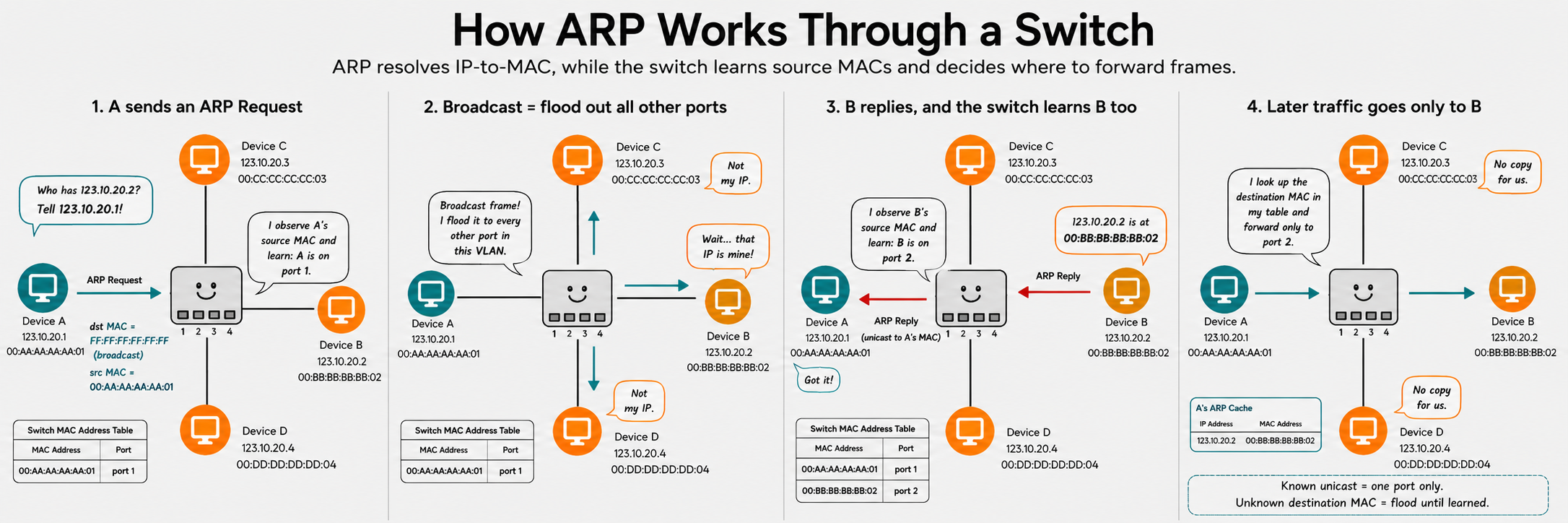
He writes his note. The note inside says, “Hi — I’m Bob, badge bb:11:22:33:44:55, seat 5. Whoever handles toaster orders, please write back and tell me your badge.” Then on the outside of the envelope, in the destination field, instead of writing a specific person’s badge, he writes:
FF:FF:FF:FF:FF:FF
This is a special, reserved name badge. Nobody actually wears it. It’s a magic phrase. The whole room knows, by convention, that this badge means “everyone.”
He hands the envelope to Margaret.
Margaret looks at the destination: FF:FF:FF:FF:FF:FF. She flips open the notebook. It’s not there — of course it isn’t, nobody wears that badge. So she does the only thing she ever does when a destination isn’t in her notebook: she walks around the room and hands a copy to every seat except Bob’s.
Notice what just happened. Margaret didn’t do anything special. She didn’t “recognise” Bob’s question or “decide” to broadcast. She got a destination she couldn’t find in the notebook and fell into her flood behaviour. The smart move was on the sender’s side. Bob picked the magic badge because he wanted Margaret to flood for him.
Everyone gets a copy. Most people glance at the inside, see “toaster orders” doesn’t apply to them, and drop their copy in the bin. But Alice — who, it turns out, is in charge of toaster orders — reads her copy carefully. Then she writes back to Bob, this time with the destination set to Bob’s actual badge, content: “Hi Bob, I handle toasters, my badge is aa:42:81:9c:0e:33.”
Margaret, in delivering Alice’s reply back to seat 5, also passively writes Alice into her notebook (if she hadn’t already). Bob now knows Alice’s badge. Margaret now knows Alice’s seat. Everyone has learned what they need to know from a single exchange.
In computer terms: that exchange is called ARP — Address Resolution Protocol. The magic badge FF:FF:FF:FF:FF:FF is called the broadcast MAC address. The whole protocol is just: send a question to everyone using the magic badge, the right device replies, you remember its real badge, and now you can talk directly.
This was the bit that clicked hardest for me. ARP isn’t a third behaviour on top of forward-and-flood. It’s a clever use of the flood behaviour, triggered by the sender choosing the magic destination. The switch is along for the ride. It can’t tell ARP apart from regular traffic, and it doesn’t need to.
| Trigger | Why it floods | Who decided |
|---|---|---|
| Unknown destination badge | Switch has no entry, falls back | The switch (forced by ignorance) |
Destination badge is FF:FF:FF:FF:FF:FF (broadcast) | Sender wrote “everyone” on envelope | The sender (intentional) |
(One small footnote that delighted me when I learned it: FF:FF:FF:FF:FF:FF being “all 1s” isn’t arbitrary. The lowest bit of the first byte of a MAC address is reserved to mean “this is a group address.” Hardware can check “is this a broadcast?” with a single-bit test on one byte — cheaper than a notebook lookup. Hardware-friendliness was baked into the protocol from day one.)
The Room Goes Virtual
Everything I just described is the world of a physical switch — a metal box in a rack, with Ethernet jacks on the front. Margaret is sitting in an actual room, with actual humans, passing actual paper.
The switch on my laptop is virtual. Linux runs it. The kernel calls these things bridges. Docker’s is named docker0; Podman’s is named podman0. Behaviourally, it is identical to the physical box: same notebook, same two mechanisms, same broadcast handling, same total ignorance of anything above its own little job. The difference is that Margaret has moved into the kernel, and the room around her is now made of data structures in memory rather than transistors and copper.
When a container starts, the kernel creates a virtual Ethernet cable — a veth pair. Think of it as a literal cable with two ends. One end gets moved into the container, where it shows up as eth0. The other end gets plugged into a seat in Margaret’s room. The kernel guarantees: whatever goes in one end comes out the other. That’s the entire abstraction.
And here is the part that, for me, was the unlock: the host is also seated in Margaret’s room. When Margaret’s room is first set up, the kernel gives the host its own seat at the table — its own badge, its own IP. Margaret does not know or care which seat belongs to the host and which belong to containers. They’re all just people with name badges, and she passes notes between them by the only rules she has.
Docker and Podman, at this layer, are doing three boring things:
- Ask the kernel to create the room (the bridge).
- Plug containers in and out via
vethpairs as they start and stop. - Make sure the host gets its own seat at the table.
The kernel does the actual switching. Docker and Podman are just running the room.
And here is where my bug starts to make sense: 10.88.0.1 is the host’s seat at Margaret’s table in Podman’s room. It’s the IP of the host’s port on podman0. From inside a container, that IP is “the host, as seen from inside this room.” That is what host.containers.internal is a friendly DNS name for. It’s not a magic concept — it’s the host’s seat at this particular meeting room. (Docker is the same idea with different numbers: 172.17.0.1 is where the host sits in docker0’s room.)
But the Building Has Many Rooms
If the host is sitting in Margaret’s room with an IP of 10.88.0.1, you might be wondering: what about 127.0.0.1? What about good old localhost?
Localhost is a different room.
Imagine the office building has, somewhere down the hall, a tiny private room where each company runs its own internal mail circle. The room only has one seat in it — yours — and a separate receptionist, Lorraine. Lorraine’s whole job is even simpler than Margaret’s: when you hand her a note, she walks two steps and hands it back to you. That’s it. There’s nobody else in the room. Notes you write to yourself in Lorraine’s room never leave.
Lorraine is the loopback interface — lo, address 127.0.0.1. Every Linux box has one. It’s the room where a program talks to itself.
The host has a seat in both rooms. The host sits with Margaret (10.88.0.1) and also sits with Lorraine (127.0.0.1). Different rooms, different receptionists, different addresses.
Here’s the part I’d never properly understood. When a program on the host opens a network listener — call it a doorman waiting to accept connections — it has to decide which room’s door to put the doorman in front of. Bind your doorman to 127.0.0.1 and the doorman is standing in Lorraine’s room; anyone wanting to talk to him has to be sitting in Lorraine’s room too. Bind your doorman to 10.88.0.1 and he’s standing in Margaret’s room. Bind him to 0.0.0.0 (“any room”) and he stands in every room the host has a seat in.
This is exactly where my bug lived.
When my SSH tunnel set up its listener — “please accept incoming connections on port 19001 and forward them out to the remote server” — it bound the doorman to 127.0.0.1. The doorman set up shop in Lorraine’s room.
When I, on the host, ran curl https://127.0.0.1:19001/ping from a terminal, I was sitting in Lorraine’s room asking for the door to be answered. The doorman was right there. He answered. curl worked.
But when the Portainer container — sitting at the table in Margaret’s room — sent its request to the host’s interface on the bridge (10.88.0.1:19001), the request arrived through Margaret’s room. The container knocked on a door in Margaret’s room. The doorman wasn’t there. He was over in Lorraine’s room. The host had no listener on this interface for this port. Connection refused.
The fix, once I could see it, was idiotic in its smallness. Bind the SSH tunnel’s listener to 10.88.0.1 instead. Or 0.0.0.0. Anything that put the doorman in the room where the container’s knock would actually land.
But getting to “idiotic in its smallness” required me to know there were multiple rooms at all. Which required me to know what a bridge was. Which required me to know that Margaret only does two things. Which is why this is post one.
So, Did It All Make Sense?
It made more sense. Not all sense.
I now understood why 10.88.0.1 mattered and why it isn’t the same as 127.0.0.1. I could see Margaret’s room in my head — a virtual conference room with my container at one seat and the host at another, Margaret passing notes by name badge, doing forward-or-flood and nothing else. I could see why a listener bound to one interface — a doorman in one room — was invisible to traffic arriving from another. I could see why ARP wasn’t magic — just Bob using the magic “everyone” badge to ask a question, and the switch faithfully flooding because that’s all it knows how to do.
But a much weirder question had taken its place. The whole story above assumes that a container has its own network stack to plug into Margaret’s room. The container is, supposedly, just a process running on my laptop’s kernel. So how does a process get its own network card? Its own IP? Its own seat in Lorraine’s private little room that isn’t the host’s seat in Lorraine’s room?
And come to think of it — when I’d been confidently saying “containers are isolated,” what did I actually mean by isolated? Isolated from what? Using what mechanism? Where in the kernel does that isolation live?
I had filled in one gap and immediately found a bigger one underneath it.
Network namespaces are coming — the kernel feature that lets a single Linux machine pretend to be many independent networks, all running side by side, all believing they have their own 127.0.0.1. It’s the foundation of containers, VPNs, and a surprising amount of modern infrastructure — and once it clicks, the veth pair I waved at above suddenly stops being a metaphor and starts being a piece of obvious plumbing.
See you next post.
(Written by Human, improved using AI where applicable.)